Deprecated : Constant E_STRICT is deprecated in /www/wwwroot/system/core/Exceptions.php on line 75
A PHP Error was encountered
Severity: 8192
Message: Creation of dynamic property CI_URI::$config is deprecated
Filename: core/URI.php
Line Number: 101
Backtrace:
File: /www/wwwroot/Art/index.php
A PHP Error was encountered
Severity: 8192
Message: Creation of dynamic property CI_Router::$uri is deprecated
Filename: core/Router.php
Line Number: 127
Backtrace:
File: /www/wwwroot/Art/index.php
A PHP Error was encountered
Severity: 8192
Message: Creation of dynamic property Detail::$benchmark is deprecated
Filename: core/Controller.php
Line Number: 75
Backtrace:
File: /www/wwwroot/Art/application/core/MY_Controller.php
File: /www/wwwroot/Art/application/controllers/Detail.php
File: /www/wwwroot/Art/index.php
A PHP Error was encountered
Severity: 8192
Message: Creation of dynamic property Detail::$hooks is deprecated
Filename: core/Controller.php
Line Number: 75
Backtrace:
File: /www/wwwroot/Art/application/core/MY_Controller.php
File: /www/wwwroot/Art/application/controllers/Detail.php
File: /www/wwwroot/Art/index.php
A PHP Error was encountered
Severity: 8192
Message: Creation of dynamic property Detail::$config is deprecated
Filename: core/Controller.php
Line Number: 75
Backtrace:
File: /www/wwwroot/Art/application/core/MY_Controller.php
File: /www/wwwroot/Art/application/controllers/Detail.php
File: /www/wwwroot/Art/index.php
A PHP Error was encountered
Severity: 8192
Message: Creation of dynamic property Detail::$log is deprecated
Filename: core/Controller.php
Line Number: 75
Backtrace:
File: /www/wwwroot/Art/application/core/MY_Controller.php
File: /www/wwwroot/Art/application/controllers/Detail.php
File: /www/wwwroot/Art/index.php
A PHP Error was encountered
Severity: 8192
Message: Creation of dynamic property Detail::$utf8 is deprecated
Filename: core/Controller.php
Line Number: 75
Backtrace:
File: /www/wwwroot/Art/application/core/MY_Controller.php
File: /www/wwwroot/Art/application/controllers/Detail.php
File: /www/wwwroot/Art/index.php
A PHP Error was encountered
Severity: 8192
Message: Creation of dynamic property Detail::$uri is deprecated
Filename: core/Controller.php
Line Number: 75
Backtrace:
File: /www/wwwroot/Art/application/core/MY_Controller.php
File: /www/wwwroot/Art/application/controllers/Detail.php
File: /www/wwwroot/Art/index.php
A PHP Error was encountered
Severity: 8192
Message: Creation of dynamic property Detail::$exceptions is deprecated
Filename: core/Controller.php
Line Number: 75
Backtrace:
File: /www/wwwroot/Art/application/core/MY_Controller.php
File: /www/wwwroot/Art/application/controllers/Detail.php
File: /www/wwwroot/Art/index.php
A PHP Error was encountered
Severity: 8192
Message: Creation of dynamic property Detail::$router is deprecated
Filename: core/Controller.php
Line Number: 75
Backtrace:
File: /www/wwwroot/Art/application/core/MY_Controller.php
File: /www/wwwroot/Art/application/controllers/Detail.php
File: /www/wwwroot/Art/index.php
A PHP Error was encountered
Severity: 8192
Message: Creation of dynamic property Detail::$output is deprecated
Filename: core/Controller.php
Line Number: 75
Backtrace:
File: /www/wwwroot/Art/application/core/MY_Controller.php
File: /www/wwwroot/Art/application/controllers/Detail.php
File: /www/wwwroot/Art/index.php
A PHP Error was encountered
Severity: 8192
Message: Creation of dynamic property Detail::$security is deprecated
Filename: core/Controller.php
Line Number: 75
Backtrace:
File: /www/wwwroot/Art/application/core/MY_Controller.php
File: /www/wwwroot/Art/application/controllers/Detail.php
File: /www/wwwroot/Art/index.php
A PHP Error was encountered
Severity: 8192
Message: Creation of dynamic property Detail::$input is deprecated
Filename: core/Controller.php
Line Number: 75
Backtrace:
File: /www/wwwroot/Art/application/core/MY_Controller.php
File: /www/wwwroot/Art/application/controllers/Detail.php
File: /www/wwwroot/Art/index.php
A PHP Error was encountered
Severity: 8192
Message: Creation of dynamic property Detail::$lang is deprecated
Filename: core/Controller.php
Line Number: 75
Backtrace:
File: /www/wwwroot/Art/application/core/MY_Controller.php
File: /www/wwwroot/Art/application/controllers/Detail.php
File: /www/wwwroot/Art/index.php
A PHP Error was encountered
Severity: 8192
Message: Creation of dynamic property Detail::$load is deprecated
Filename: core/Controller.php
Line Number: 78
Backtrace:
File: /www/wwwroot/Art/application/core/MY_Controller.php
File: /www/wwwroot/Art/application/controllers/Detail.php
File: /www/wwwroot/Art/index.php
A PHP Error was encountered
Severity: 8192
Message: Creation of dynamic property Detail::$db is deprecated
Filename: core/Loader.php
Line Number: 390
Backtrace:
File: /www/wwwroot/Art/application/core/MY_Controller.php
File: /www/wwwroot/Art/application/controllers/Detail.php
File: /www/wwwroot/Art/index.php
A PHP Error was encountered
Severity: 8192
Message: Creation of dynamic property CI_DB_mysqli_driver::$failover is deprecated
Filename: database/DB_driver.php
Line Number: 371
Backtrace:
File: /www/wwwroot/Art/application/core/MY_Controller.php
File: /www/wwwroot/Art/application/controllers/Detail.php
File: /www/wwwroot/Art/index.php
A PHP Error was encountered
Severity: 8192
Message: Return type of CI_Session_files_driver::open($save_path, $name) should either be compatible with SessionHandlerInterface::open(string $path, string $name): bool, or the #[\ReturnTypeWillChange] attribute should be used to temporarily suppress the notice
Filename: drivers/Session_files_driver.php
Line Number: 132
Backtrace:
File: /www/wwwroot/Art/application/core/MY_Controller.php
File: /www/wwwroot/Art/application/controllers/Detail.php
File: /www/wwwroot/Art/index.php
A PHP Error was encountered
Severity: 8192
Message: Return type of CI_Session_files_driver::close() should either be compatible with SessionHandlerInterface::close(): bool, or the #[\ReturnTypeWillChange] attribute should be used to temporarily suppress the notice
Filename: drivers/Session_files_driver.php
Line Number: 290
Backtrace:
File: /www/wwwroot/Art/application/core/MY_Controller.php
File: /www/wwwroot/Art/application/controllers/Detail.php
File: /www/wwwroot/Art/index.php
A PHP Error was encountered
Severity: 8192
Message: Return type of CI_Session_files_driver::read($session_id) should either be compatible with SessionHandlerInterface::read(string $id): string|false, or the #[\ReturnTypeWillChange] attribute should be used to temporarily suppress the notice
Filename: drivers/Session_files_driver.php
Line Number: 164
Backtrace:
File: /www/wwwroot/Art/application/core/MY_Controller.php
File: /www/wwwroot/Art/application/controllers/Detail.php
File: /www/wwwroot/Art/index.php
A PHP Error was encountered
Severity: 8192
Message: Return type of CI_Session_files_driver::write($session_id, $session_data) should either be compatible with SessionHandlerInterface::write(string $id, string $data): bool, or the #[\ReturnTypeWillChange] attribute should be used to temporarily suppress the notice
Filename: drivers/Session_files_driver.php
Line Number: 233
Backtrace:
File: /www/wwwroot/Art/application/core/MY_Controller.php
File: /www/wwwroot/Art/application/controllers/Detail.php
File: /www/wwwroot/Art/index.php
A PHP Error was encountered
Severity: 8192
Message: Return type of CI_Session_files_driver::destroy($session_id) should either be compatible with SessionHandlerInterface::destroy(string $id): bool, or the #[\ReturnTypeWillChange] attribute should be used to temporarily suppress the notice
Filename: drivers/Session_files_driver.php
Line Number: 313
Backtrace:
File: /www/wwwroot/Art/application/core/MY_Controller.php
File: /www/wwwroot/Art/application/controllers/Detail.php
File: /www/wwwroot/Art/index.php
A PHP Error was encountered
Severity: 8192
Message: Return type of CI_Session_files_driver::gc($maxlifetime) should either be compatible with SessionHandlerInterface::gc(int $max_lifetime): int|false, or the #[\ReturnTypeWillChange] attribute should be used to temporarily suppress the notice
Filename: drivers/Session_files_driver.php
Line Number: 354
Backtrace:
File: /www/wwwroot/Art/application/core/MY_Controller.php
File: /www/wwwroot/Art/application/controllers/Detail.php
File: /www/wwwroot/Art/index.php
A PHP Error was encountered
Severity: Warning
Message: ini_set(): Session ini settings cannot be changed after headers have already been sent
Filename: Session/Session.php
Line Number: 284
Backtrace:
File: /www/wwwroot/Art/application/core/MY_Controller.php
File: /www/wwwroot/Art/application/controllers/Detail.php
File: /www/wwwroot/Art/index.php
A PHP Error was encountered
Severity: Warning
Message: session_set_cookie_params(): Session cookie parameters cannot be changed after headers have already been sent
Filename: Session/Session.php
Line Number: 291
Backtrace:
File: /www/wwwroot/Art/application/core/MY_Controller.php
File: /www/wwwroot/Art/application/controllers/Detail.php
File: /www/wwwroot/Art/index.php
A PHP Error was encountered
Severity: Warning
Message: ini_set(): Session ini settings cannot be changed after headers have already been sent
Filename: Session/Session.php
Line Number: 306
Backtrace:
File: /www/wwwroot/Art/application/core/MY_Controller.php
File: /www/wwwroot/Art/application/controllers/Detail.php
File: /www/wwwroot/Art/index.php
A PHP Error was encountered
Severity: Warning
Message: ini_set(): Session ini settings cannot be changed after headers have already been sent
Filename: Session/Session.php
Line Number: 316
Backtrace:
File: /www/wwwroot/Art/application/core/MY_Controller.php
File: /www/wwwroot/Art/application/controllers/Detail.php
File: /www/wwwroot/Art/index.php
A PHP Error was encountered
Severity: Warning
Message: ini_set(): Session ini settings cannot be changed after headers have already been sent
Filename: Session/Session.php
Line Number: 317
Backtrace:
File: /www/wwwroot/Art/application/core/MY_Controller.php
File: /www/wwwroot/Art/application/controllers/Detail.php
File: /www/wwwroot/Art/index.php
A PHP Error was encountered
Severity: Warning
Message: ini_set(): Session ini settings cannot be changed after headers have already been sent
Filename: Session/Session.php
Line Number: 318
Backtrace:
File: /www/wwwroot/Art/application/core/MY_Controller.php
File: /www/wwwroot/Art/application/controllers/Detail.php
File: /www/wwwroot/Art/index.php
A PHP Error was encountered
Severity: Warning
Message: ini_set(): Session ini settings cannot be changed after headers have already been sent
Filename: Session/Session.php
Line Number: 319
Backtrace:
File: /www/wwwroot/Art/application/core/MY_Controller.php
File: /www/wwwroot/Art/application/controllers/Detail.php
File: /www/wwwroot/Art/index.php
A PHP Error was encountered
Severity: Warning
Message: ini_set(): Session ini settings cannot be changed after headers have already been sent
Filename: Session/Session.php
Line Number: 377
Backtrace:
File: /www/wwwroot/Art/application/core/MY_Controller.php
File: /www/wwwroot/Art/application/controllers/Detail.php
File: /www/wwwroot/Art/index.php
A PHP Error was encountered
Severity: Warning
Message: ini_set(): Session ini settings cannot be changed after headers have already been sent
Filename: drivers/Session_files_driver.php
Line Number: 108
Backtrace:
File: /www/wwwroot/Art/application/core/MY_Controller.php
File: /www/wwwroot/Art/application/controllers/Detail.php
File: /www/wwwroot/Art/index.php
A PHP Error was encountered
Severity: Warning
Message: session_set_save_handler(): Session save handler cannot be changed after headers have already been sent
Filename: Session/Session.php
Line Number: 110
Backtrace:
File: /www/wwwroot/Art/application/core/MY_Controller.php
File: /www/wwwroot/Art/application/controllers/Detail.php
File: /www/wwwroot/Art/index.php
A PHP Error was encountered
Severity: Warning
Message: session_start(): Session cannot be started after headers have already been sent
Filename: Session/Session.php
Line Number: 143
Backtrace:
File: /www/wwwroot/Art/application/core/MY_Controller.php
File: /www/wwwroot/Art/application/controllers/Detail.php
File: /www/wwwroot/Art/index.php
A PHP Error was encountered
Severity: 8192
Message: Creation of dynamic property Detail::$session is deprecated
Filename: core/Loader.php
Line Number: 1279
Backtrace:
File: /www/wwwroot/Art/application/core/MY_Controller.php
File: /www/wwwroot/Art/application/controllers/Detail.php
File: /www/wwwroot/Art/index.php
A PHP Error was encountered
Severity: 8192
Message: Creation of dynamic property CI_Loader::$benchmark is deprecated
Filename: core/Loader.php
Line Number: 925
Backtrace:
File: /www/wwwroot/Art/application/core/MY_Controller.php
File: /www/wwwroot/Art/application/controllers/Detail.php
File: /www/wwwroot/Art/index.php
A PHP Error was encountered
Severity: 8192
Message: Creation of dynamic property CI_Loader::$hooks is deprecated
Filename: core/Loader.php
Line Number: 925
Backtrace:
File: /www/wwwroot/Art/application/core/MY_Controller.php
File: /www/wwwroot/Art/application/controllers/Detail.php
File: /www/wwwroot/Art/index.php
A PHP Error was encountered
Severity: 8192
Message: Creation of dynamic property CI_Loader::$config is deprecated
Filename: core/Loader.php
Line Number: 925
Backtrace:
File: /www/wwwroot/Art/application/core/MY_Controller.php
File: /www/wwwroot/Art/application/controllers/Detail.php
File: /www/wwwroot/Art/index.php
A PHP Error was encountered
Severity: 8192
Message: Creation of dynamic property CI_Loader::$log is deprecated
Filename: core/Loader.php
Line Number: 925
Backtrace:
File: /www/wwwroot/Art/application/core/MY_Controller.php
File: /www/wwwroot/Art/application/controllers/Detail.php
File: /www/wwwroot/Art/index.php
A PHP Error was encountered
Severity: 8192
Message: Creation of dynamic property CI_Loader::$utf8 is deprecated
Filename: core/Loader.php
Line Number: 925
Backtrace:
File: /www/wwwroot/Art/application/core/MY_Controller.php
File: /www/wwwroot/Art/application/controllers/Detail.php
File: /www/wwwroot/Art/index.php
A PHP Error was encountered
Severity: 8192
Message: Creation of dynamic property CI_Loader::$uri is deprecated
Filename: core/Loader.php
Line Number: 925
Backtrace:
File: /www/wwwroot/Art/application/core/MY_Controller.php
File: /www/wwwroot/Art/application/controllers/Detail.php
File: /www/wwwroot/Art/index.php
A PHP Error was encountered
Severity: 8192
Message: Creation of dynamic property CI_Loader::$exceptions is deprecated
Filename: core/Loader.php
Line Number: 925
Backtrace:
File: /www/wwwroot/Art/application/core/MY_Controller.php
File: /www/wwwroot/Art/application/controllers/Detail.php
File: /www/wwwroot/Art/index.php
A PHP Error was encountered
Severity: 8192
Message: Creation of dynamic property CI_Loader::$router is deprecated
Filename: core/Loader.php
Line Number: 925
Backtrace:
File: /www/wwwroot/Art/application/core/MY_Controller.php
File: /www/wwwroot/Art/application/controllers/Detail.php
File: /www/wwwroot/Art/index.php
A PHP Error was encountered
Severity: 8192
Message: Creation of dynamic property CI_Loader::$output is deprecated
Filename: core/Loader.php
Line Number: 925
Backtrace:
File: /www/wwwroot/Art/application/core/MY_Controller.php
File: /www/wwwroot/Art/application/controllers/Detail.php
File: /www/wwwroot/Art/index.php
A PHP Error was encountered
Severity: 8192
Message: Creation of dynamic property CI_Loader::$security is deprecated
Filename: core/Loader.php
Line Number: 925
Backtrace:
File: /www/wwwroot/Art/application/core/MY_Controller.php
File: /www/wwwroot/Art/application/controllers/Detail.php
File: /www/wwwroot/Art/index.php
A PHP Error was encountered
Severity: 8192
Message: Creation of dynamic property CI_Loader::$input is deprecated
Filename: core/Loader.php
Line Number: 925
Backtrace:
File: /www/wwwroot/Art/application/core/MY_Controller.php
File: /www/wwwroot/Art/application/controllers/Detail.php
File: /www/wwwroot/Art/index.php
A PHP Error was encountered
Severity: 8192
Message: Creation of dynamic property CI_Loader::$lang is deprecated
Filename: core/Loader.php
Line Number: 925
Backtrace:
File: /www/wwwroot/Art/application/core/MY_Controller.php
File: /www/wwwroot/Art/application/controllers/Detail.php
File: /www/wwwroot/Art/index.php
A PHP Error was encountered
Severity: 8192
Message: Creation of dynamic property CI_Loader::$load is deprecated
Filename: core/Loader.php
Line Number: 925
Backtrace:
File: /www/wwwroot/Art/application/core/MY_Controller.php
File: /www/wwwroot/Art/application/controllers/Detail.php
File: /www/wwwroot/Art/index.php
A PHP Error was encountered
Severity: 8192
Message: Creation of dynamic property CI_Loader::$db is deprecated
Filename: core/Loader.php
Line Number: 925
Backtrace:
File: /www/wwwroot/Art/application/core/MY_Controller.php
File: /www/wwwroot/Art/application/controllers/Detail.php
File: /www/wwwroot/Art/index.php
A PHP Error was encountered
Severity: 8192
Message: Creation of dynamic property CI_Loader::$session is deprecated
Filename: core/Loader.php
Line Number: 925
Backtrace:
File: /www/wwwroot/Art/application/core/MY_Controller.php
File: /www/wwwroot/Art/application/controllers/Detail.php
File: /www/wwwroot/Art/index.php
ThinkPHP集成PHPMailer发送邮件-文章详情-小白的笔记本
ThinkPHP集成PHPMailer发送邮件
作者:小白鱼鱼 来源:转载 发布:2016-04-10 阅读:4689
原文地址:http://www.awaimai.com/604.html
如需转载此文,请注明原文转载地址,以尊重原创人员!
标签:thinkphp,phpmailer
下载 PHPMailer 发送邮件需要两个文件,如下:
class.phpmailer.php
class.smtp.php
下载地址:https://github.com/PHPMailer/PHPMailer
如果要用POP3接收邮件,还需下载 class.pop3.php 文件,本文主要讲发送邮件,收邮件方法类似。
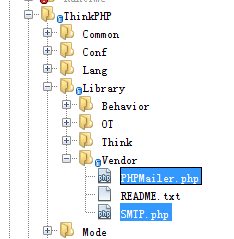
部署文件 将下载的 class.phpmailer.php 和 class.smtp.php 文件放到 ThinkPHP/Library/Vendor 目录下:
分别重命名两个文件为:PHPMailer.php 和 SMTP.php 。
使用 使用方法简单,首先在需要用 PHPMailer 类的文件,使用 vendor() 方法导入这两个类文件:
 vendor('SMTP');
 vendor('PHPMailer');
然后就可以开始用了:
$mail = new \PHPMailer;
//$mail->SMTPDebug = 3; // Enable verbose debug output
$mail->CharSet = 'UTF-8'; // Set CharSet to UTF-8
$mail->isSMTP(); // Set mailer to use SMTP
$mail->Host = 'smtp1.example.com;smtp2.example.com'; // Specify main and backup SMTP servers
$mail->SMTPAuth = true; // Enable SMTP authentication
$mail->Username = 'user@example.com'; // SMTP username
$mail->Password = 'secret'; // SMTP password
$mail->Port = 25; / TCP port to connect to
$mail->setFrom('from@example.com', 'Mailer');
$mail->addAddress('joe@example.net', 'Joe User'); // Add a recipient
$mail->addAddress('ellen@example.com'); // Name is optional
$mail->addReplyTo('info@example.com', 'Information');
$mail->addCC('cc@example.com');$mail->addBCC('bcc@example.com');
$mail->addAttachment('/var/tmp/file.tar.gz'); // Add attachments
$mail->addAttachment('/tmp/image.jpg', 'new.jpg'); // Optional name
$mail->isHTML(true); // Set email format to HTML
$mail->Subject = 'Here is the subject';
$mail->Body = 'This is the HTML message body in bold! ';
$mail->AltBody = 'This is the body in plain text for non-HTML mail clients';
if(!$mail->send()) {
echo 'Message could not be sent.';
echo 'Mailer Error: ' . $mail->ErrorInfo;
}
else{
echo 'Message has been sent';
} 这样就可以了。
↑